Designing Role-Based Access Control (RBAC) System

Access control is often invisible—until it breaks. Whether you’re building a product for 10 users or 10,000, managing who can see and do what in the application becomes critical. That’s where Role-Based Access Control (RBAC), comes in. It's not just a technical backend system; it directly shapes how users interact with the product.
What is RBAC, Really?
RBAC stands for Role-Based Access Control. In simple terms, it’s a way to manage permissions based on a user’s role within an organization. Here I will be more specific to Fleet Management Industry.
Instead of assigning access rules to every single user individually (which quickly becomes a nightmare), RBAC allows you to group permissions under defined roles like:
Admin – can access everything
Manager – can view and edit data, but not manage users
Viewer – read-only access
Other Specific Roles - users can be assigned roles basis their job or need (Ex: An Insurance provider will only require access to Vehicle and Driver details, why give him access to other critical data about the fleet - in this case, he will only get access to Vehicle and Drivers pages and no other pages that will have links to.
Users can be assigned one or more roles, and the system enforces what they can or can’t do based on those roles. You can nam the roles basis the permissions or whatever you want.
The User Flow
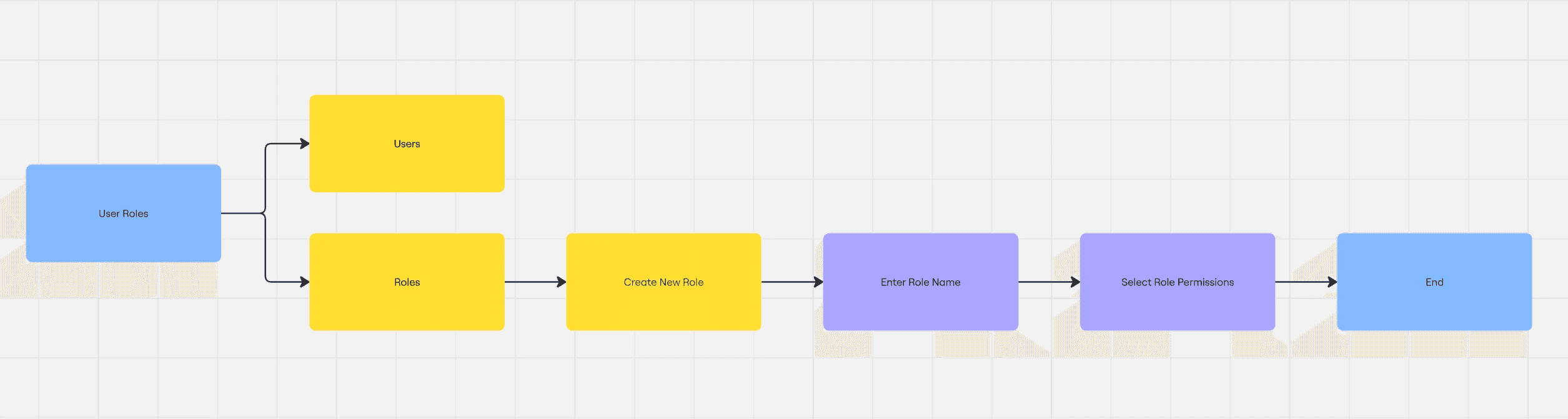
The system had to be intuitive enough for non-technical users to manage roles without developer help. Here's how you can easily create a new role:
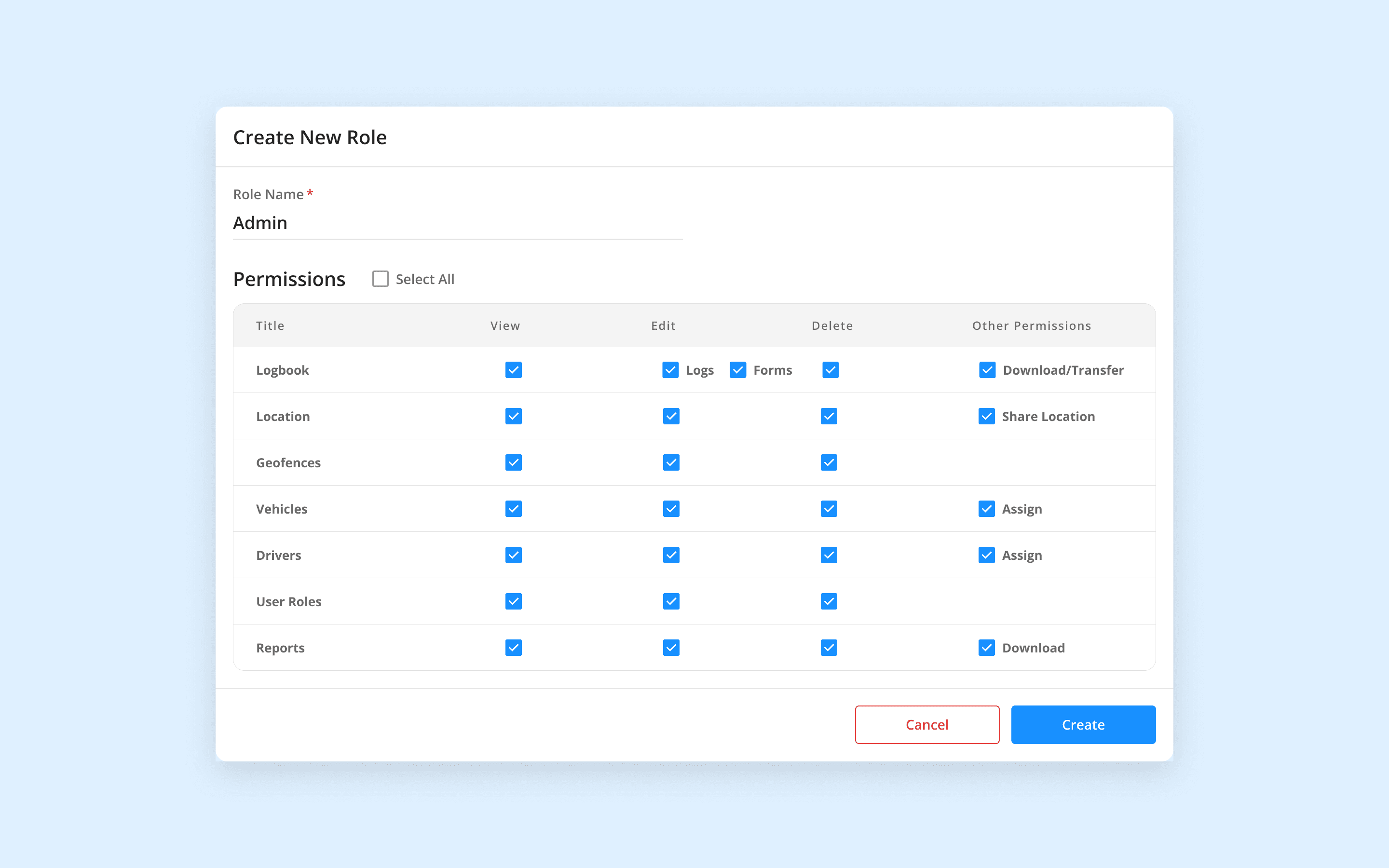
We designed a modular permission grid where each module can be toggled for:
View
Edit (with sub-permissions like “Logs” and “Forms”)
Delete
Other Actions (e.g., Download, Assign, Share Location)
This layout ensured users had both control and clarity, minimizing errors and misconfigurations.
Key UX Decisions
Grouped Permissions: Instead of overwhelming the user with dozens of checkboxes, we grouped sub-actions for contextual clarity.
Expandable Control: “Select All” functionality speeds up setup for new roles, while granular checkboxes support edge cases.
Conclusion
Designing an RBAC system isn't just about limiting access—it's about empowering the right people with the right tools while protecting sensitive data. In the context of fleet management, where users range from internal teams to external vendors, having a flexible yet intuitive role management system is crucial.
By focusing on clarity, simplicity, and real-world use cases, we built a permissions model that not only scales with the organization but also adapts to diverse user needs without sacrificing security or usability. Whether it's an insurance partner accessing vehicle records or a fleet manager overseeing operations, the system makes sure that everyone sees exactly what they need—nothing more, nothing less.
When access control is well-designed, it becomes seamless.